Tuesday, June 30, 2020
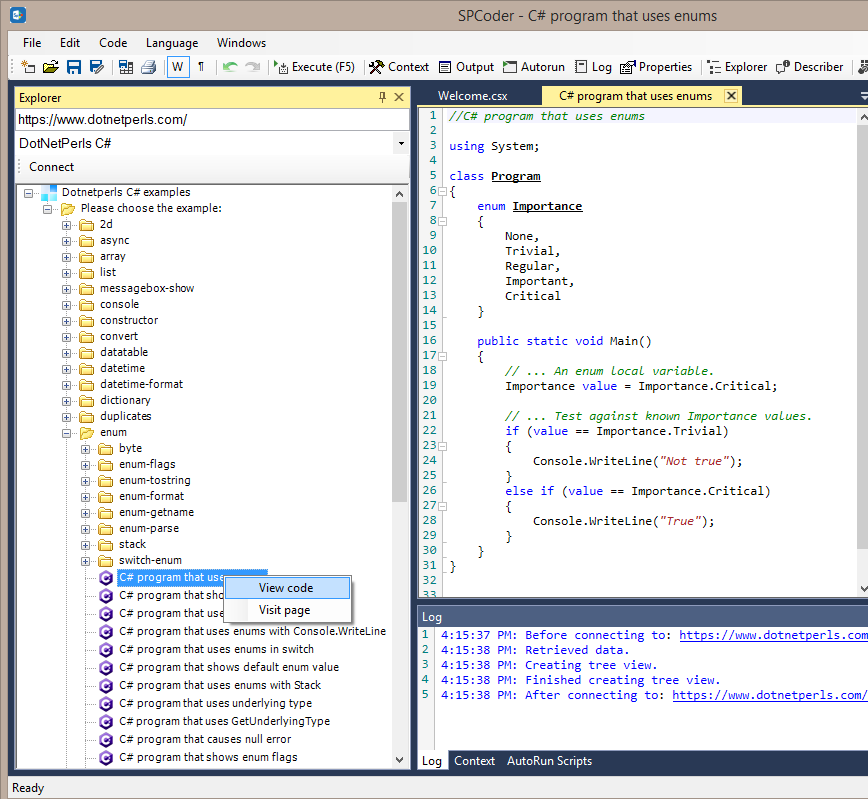
Execute C# DotNetPerls examples in SPCoder

Wednesday, June 24, 2020
Run C# script files in Azure WebJob
- .cmd, .bat, .exe (Windows cmd)
- .ps1 (PowerShell)
- .sh (Bash)
- .php (PHP)
- .py (Python)
- .js (Node.js)
- .jar (Java)
<add key="CodePath" value="Code\init.csx" />
#r "System.Data" #r "{{WorkingDirectory}}\mycustomlibrary.dll"
//...
//....
//here you can prepare all the csx files that should be executed
string folder = @"Code\";
FilesRegisteredForExecution.Add(folder + "code.csx");
//FilesRegisteredForExecution.Add(folder + "code1.csx");
//FilesRegisteredForExecution.Add(folder + "code2.csx");
//....
Monday, June 22, 2020
Corona can even spread to SharePoint - with C#
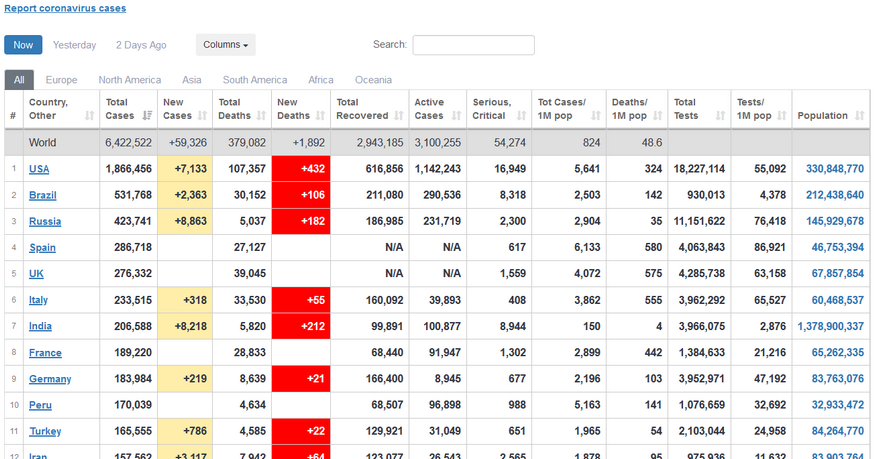
| Worldometer's COVID-19 data |
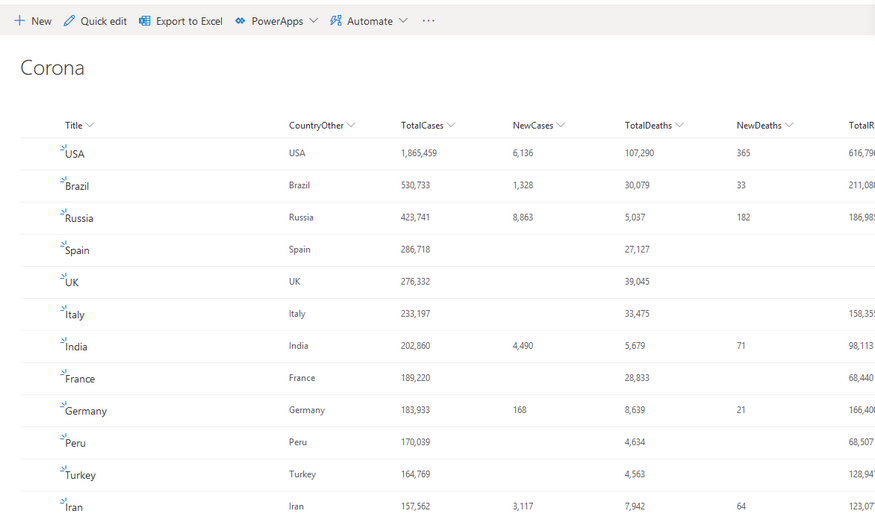
| SharePoint list with data from Worldometer site |
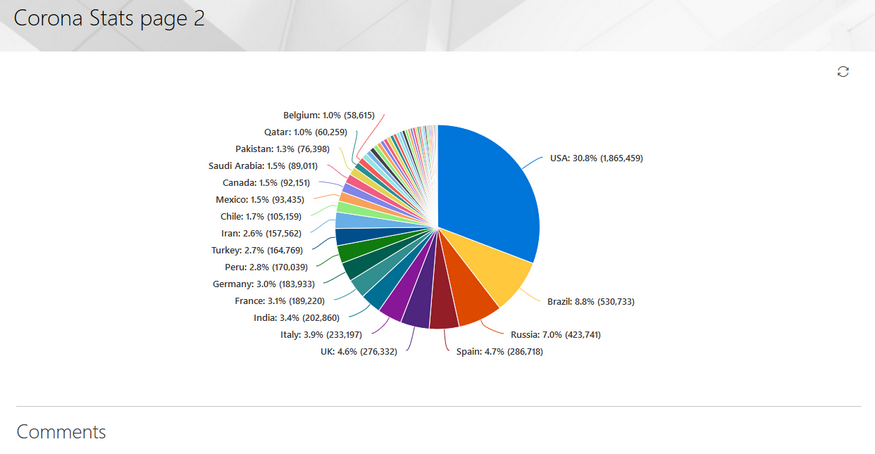
| SharePoint modern page - pie chart with coronavirus data |
//Get the data using "Web page" connector
main.Connect("https://www.worldometers.info/coronavirus/#countries", "Web page");
//Get the table of latest infromation about the corona virus in the different countries
//------------
//here we use the HtmlAgilityPack project (https://html-agility-pack.net/)
//to scrape the page and get the html table element that contains the data
var htmlnode = htmldocument.DocumentNode;
var htmltable = htmlnode.SelectSingleNode("//table[@id='main_table_countries_today']");
var thnodes = htmltable.SelectSingleNode("thead").SelectNodes(".//th");
var tbodyNode = htmltable.SelectSingleNode("(tbody)[1]");
var nodes = tbodyNode.SelectNodes("tr[not(contains(@class,'row_continent'))]");
//create the DataTable object
var table = new DataTable("Corona");
var headers = thnodes.Select(th => th.InnerText.Trim()
.Replace("\n","")
.Replace(","," ")
.Replace(" "," ")
.Replace("/"," per "))
.ToList();
//create the columns in DataTable
foreach (var header in headers)
{
table.Columns.Add(header);
}
//get the rows from html table and clean some of the values
var rows = nodes.Skip(1).Select(tr => tr
.Elements("td")
.Select(td => td.InnerText.Trim()
.Replace(",","")
.Replace("N/A","")
.Replace("+",""))
.ToArray());
//add the rows to the DataTable
foreach (var row in rows)
{
table.Rows.Add(row);
}
//------------
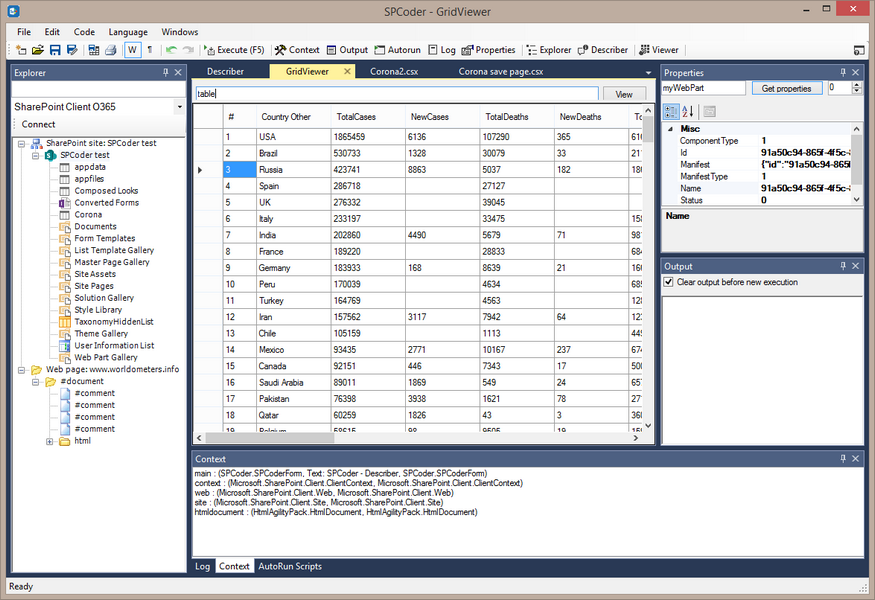
| SPCoder GridView window showing the scraped data |
//------------
//first we need to connect to the SharePoint online site
//Here I use the main.Connect method, but you could also use the SPCoder's Explorer window for this.
//The third and the fourth parameters of the main.Connect method are username and password.
//It is possible to write those values in clear text, but here I use the SPCoder's encryption mechanism.
//ENCRYPTEDUSERNAME and ENCRYPTEDPASSWORD have been created using "Crypto helper" window
string myUsername = main.Decrypt("ENCRYPTEDUSERNAME");
string myPassword = main.Decrypt("ENCRYPTEDPASSWORD");main.Connect("https://MYtenant.sharepoint.com/sites/SPCodertest/",
"SharePoint Client O365", myUsername, myPassword);//after this we are connected to the SP Online site and have the context (ClientContext) variable available
//you will also notice that the site has appeared in the Explorer window and you can
//expand its subsites and see all the lists and libraries
//prepare the code for creating lists (you can also open the Utils.csx file in
//SPCoder and execute it instead of the following line)
execFile("Scripts\\CSharp\\SharePoint\\Utils.csx");
//Here we prepare the fields of the list
List<SPCoderField> myFields = new List<SPCoderField> ();
for(int i = 0; i < headers.Count; i++)
{
var header = headers[i];
string fieldType = "Number";
if (header == "Country Other" || header == "Continent") fieldType = "String";
if (header =="#") continue;
myFields.Add(new SPCoderField {
Name = header.Replace(" ",""),
DisplayName = header.Replace(" ",""),
Type = fieldType,
Group = "Corona",
Values = null}
);
}
//here we create the SharePoint list called Corona.
var list = CreateListWithFields(myFields, web, "Corona", context);
//------------
//------------
//add the data to the list
//System.Data.DataRow row = table.Rows[0];
int cnt = 0;
foreach(System.Data.DataRow row in table.Rows)
{
ListItemCreationInformation itemCreateInfo = new ListItemCreationInformation();
ListItem oListItem = list.AddItem(itemCreateInfo);
oListItem["Title"] = row["Country Other"].ToString();
for(int i = 0; i < headers.Count; i++)
{
var header = headers[i];
if (!String.IsNullOrEmpty(row[header].ToString()))
{
if (header =="#") continue;
string internalName = list.Fields
.Where(m => m.Title == header.Replace(" ",""))
.FirstOrDefault()
.InternalName;
if (header != "Country Other" && header != "Continent")
{
double num = Double.Parse(row[header].ToString());
oListItem[internalName] = num;
}
else
{
oListItem[internalName] = row[header].ToString();
}
}
}
oListItem.Update();
//we are sending the data to the server after every 50 items for performance reasons
if (++cnt % 50 == 0) context.ExecuteQuery();
}
context.ExecuteQuery();
//------------
Now, the next step is to create the modern page, add the pie-chart to it and show the Total cases per country on the chart.
This part of the code uses OfficeDevPnP CSOM library for easier handling of the modern pages. The library is included in SPCoder, so you don't have to download it yourself.
using OfficeDevPnP.Core.Pages;
// get a list of possible client side web parts that can be added
ClientSidePage p = new ClientSidePage(context);
var components = p.AvailableClientSideComponents();
var myWebPart = components.Where(s => s.ComponentType == 1 && s.Manifest.Contains("QuickChartWebPart"))
.FirstOrDefault();
CanvasSection cs = new CanvasSection(p, CanvasSectionTemplate.OneColumn, 5);
p.AddSection(cs);
ClientSideWebPart helloWp = new ClientSideWebPart(myWebPart) { Order = 10 };
helloWp.PropertiesJson =
@"{'data':[{'id':'7CFFD4B0-436E-430D-94C5-A4F9D22DB3FE','label':'','value':'','valueNumber':0}],'type':1,
'isInitialState':false,'dataSourceType':1,'listItemOrderBy':0,
'selectedListId':'" + list.Id.ToString() + "','selectedLabelFieldName':'Title',
'selectedValueFieldName':'TotalCases','xAxisLabel':'','yAxisLabel':''}";
p.AddControl(helloWp, cs.Columns[0]);
//This will save the page to SitePages library
p.PageTitle = "Corona Stats page 2";
p.LayoutType = ClientSidePageLayoutType.Article;
p.Save("CoronaStats2.aspx");
Thursday, January 09, 2014
SPCoder
Update 2020: This post is related to the old, IronPython version of SPCoder. For the new, C# version of SPCoder, please check this link.
I've been developing code for MS SharePoint since year 2004. SharePoint was evolving with every new version since then, but all the versions had one thing in common and that is the lack of an "easy" way to manipulate its object model. By "easy" here I mean visual, fast, scriptable. There is no tool where developer/admin could write some code in a visual environment directly on server, using full SharePoint object model, execute it, share it, etc.
There are a lot of very useful blogs out there where SP developers share a solution to a problem solved by writing simple console application which usually has 5-10 lines of code in which they call a couple of methods from SP object model. I also wrote a number of console apps like that in different situations and it was always taking me a lot of time.. firing up a dev machine with visual studio, writing code/compiling/testing on dev machine, publishing app to server and executing. Of course if you have to change anything you have to go through the procedure of write/compile/test/publish/execute again...
Ok, you certainly get my point by now :) So, my solution to this problem was to write a tool which you can use to interactively work with SharePoint's object model. It is called SPCoder, it is free to use and you can download it from https://spcoder.codeplex.com.
About
SPCoder uses IronPython for accessing SharePoint's object model. It works on server and foundation versions of SharePoint 2007, 2010 and 2013. Here is the screenshot of SPCoder in action:
You don't have to have any previous knowledge of IronPython in order to use SPCoder. In fact SPCoder has very useful features which you can use without any coding (Describer and Property viewer). The documentation of all the SPCoder's features can be found here: https://spcoder.codeplex.com/documentation
Here are a couple examples on what can be done with SPCoder:
#download all files from the SP library to a local folder
local = "C:\Temp\Imgs"
for i in list.Items:
f = i.File
binary = f.OpenBinary()
stream = IO.FileStream(local + "/" + f.Name, IO.FileMode.Create)
writer = IO.BinaryWriter(stream)
writer.Write(binary)
writer.Close()
--#add users to a security group if usernames are located in the SP list gr = web.SiteGroups["group_name"] for l in list1.Items: u = web.EnsureUser(l["UserId"]) gr.AddUser(u)--
#change the content type for all items in the list
ct = list2.ContentTypes["ct_name"]
for i in list2.Items:
i["Content Type"] = ct.Name;
i["Content Type ID"] = ct.Id.ToString();
i.SystemUpdate()
--The important thing to note here is that these example scripts will work on any SP server, you just need to drag'n'drop appropriate objects to SPCoder context window and name them like web, list, list1 and list2 (which SPCoder does by default for these types of objects).
If you want to try SPCoder, please first take a look at this Quick Tutorial. It will take you just a few minutes but it will give you all you need for start.
Monday, July 30, 2007
Dynamic generation of javascript code
If the code is more coupled to the problem , it solves the problem better, but when the problem changes it is harder to change the code. And the oposite .. when the code is more abstract it is easier to change it, but then (generally speaking) the solution is not so good (as it could be in first case).
I am not going to write about the right level of abstraction, because I don’t know it :)
Instead, I am going to write about javascript and some of its interesting features.
Assume that we have the following problem:
We need to write a function that calculates the sum of first n integers.
The first solution that would probably come to everyone’s mind would be the classic for loop that loops from 1 to n and adds value of the counter to some variable..
It could be written as:
function getSum1(n)
{
var s = 0;
for(var i = 1; i <= n; i++)
s += i;
return s;
}
This is, of course, totally correct solution, but is it the best one?
Well, it solves the problem.. and is flexible enough to calculate the sum for every given integer.. so, it probably is the best.
But!
What if we know the number that will be passed to the function before it is called?
If so, it would be better if we wrote the function like this:
function getSum2()
{
return 1+2+3+4+5+6+7+8+9+10;
}
It would be much faster than the first one.
But, as the beginning of this post says.. it is not flexible. It solves the problem, but it is very coupled to it, so when the problem changes (the number n) it is useless.
We have 2 solutions. Which is better? Well, it depends on the fact how many times is function going to be called with the same parameter, and the importance of the execution speed.
I wrote some tests that can be found here.
There are functions that calculate sum of the first 100 integers, and are called 100000 times.
First one calls the function with the classic for loop (getSum1):
var howManyTimes = 100000;
timeStart = new Date();
for (var i = 0; i<howManyTimes; i++)
{
result = getSum1(100);
}
timeStop = new Date();
It then prints duration and the result.
The second test calls the function that generates the code for getSum2 function. After generating , the code is evaluated using the eval function (so the new function is created dynamically):
function createFunction1(val,functName)
{
var code = "function "+functName+"\n{ \n return 0";
for (var i=1; i<=val;i++)
code+="+"+i;
code += "; \n }";
return code;
}
timeStart = new Date();
var code = createFunction1(100,"getSum2()");
eval(code);
for (var i = 0; i<howManyTimes; i++)
{
result = getSum2();
}
timeStop = new Date();
After that it also prints duration and the result.
And finally the third test generates the function using javascript Function object.
function createFunction2(val)
{
var code = " return 0";
for (var i=1; i<=val;i++)
code+="+"+i;
code += ";";
return code;
}
timeStart = new Date();
var code = createFunction2(100);
var getSum3 = new Function(code);
for (var i = 0; i<howManyTimes; i++)
{
result = getSum3();
}
timeStop = new Date();
You can see the results of the tests if you run the test file in your browser.
My average results are:
In firefox: getSum1 ~ 4900ms
getSum2 ~ 550ms
getSum3 ~ 450ms
In IE6: getSum1 ~ 4800ms
getSum2 ~ 840ms
getSum3 ~ 740ms
After all this you can say… ok, this is fine, but.. is there any chance that we can use this in real world, in something more complex than the sum of n numbers?
Well, there might be.
Some of today’s most popular java and .NET frameworks (Spring, Spring.NET) use dynamic code generation in their AOP libraries.
I think that in near future some applications could have "smart execution controllers" that would know whether to call an abstract code or to generate concrete code and call it. Especially in applications where performance (speed) is bottle neck.
Friday, September 22, 2006
bez alata nema zanata : aptana - The Web IDE
Toliko mudrosti u samo par reči! Mudrosti koja traje večno. Mudrosti koja može da se primeni na veliki broj problema sa kojima se ljudi sreću, bez obzira na trenutak u kome se ljudi i problemi nalaze.
Iako znam da su te poslovice primenljive na dosta situacija iz prostog razloga što su jako apstraktne, ta rima im nekako daje dušu i čini ih večnim.
Elem.
Verovatno Vam se desilo da treba da pišete neki JavaScript kood.
U principu bilo ko, ko je ikada pravio neku web stranicu imao je potrebu da napiše, ako ništa drugo onda nekakav validator za unos e-maila i sl. U takvim situacijama za pisanje tog JavaScripta se naravno koristi okruženje u kome pravite i ostatak sajta.. dreamweaver, zend, visual studio, notepad... I to je OK.
Ali šta sa situacijom kada stranica treba da ima dosta klijentskog kooda. Dosta ~ 1000 linija ili nekoliko hiljada linija..!? Tada dolazi do izražaja činjenica da ni jedno od pomenutih okruženja nema dobru podršku za pisanje JavaScripta.
Nekako mi se čini da su svi ti alati , pošto su pravljeni za html + php,asp,jsp...(ili šta već) , JavaScript shvatili kao nužno zlo, i pravili samo neke osnovne stvari vezane za to nužno zlo...
Sa razvojem Web 2.0 priče naglo je porasla potreba za okruženjem koje je napravljeno za JavaScript. Moram priznati da sam se oduševio kada sam naleteo na Aptana-u.
To je IDE zasnovan na Eclipse platformi. Postoji standalone varijanta, kao i plugin za Eclipse, ukoliko ga već imate na računaru.
Ne bih sada da nabrajam opcije koje poseduje Aptana, jer postoji dokumentacija na zvaničnom sajtu, samo bih napomenuo da ima jako dobar Code Assist ili Intelli Sense (ako tako neko više voli ;) )
Neke od stvari koje uskoro planiraju da dodaju okruženju su:
- Internationalization
- PHP Colorizing
- PHP Code Assist
- JavaScript Debugging
- Refactoring
- ....
Tuesday, June 27, 2006
sudoku
Verovatno ste svi čuli za igru Sudoku.
Pravila su vrlo jednostavna:
Dobijete matricu dimenzija 9x9, koja je dodatno izdeljena na 9 manjih matrica (3x3), u neka polja su upisani brojevi od 1 do 9 i vi treba da popunite celu matricu tako da se u svakom redu i koloni, ali i u unutrašnjoj matrici od 3 x 3 polja, nađu brojevi od 1 do 9, pri čemu se oni ne smeju ponavljati.
Jedan nemački matematičar izračunao je da je ukupan broj kombinacija u ovoj igri 6.670.903.752.021.072.936.960, što, kako negde pročitah, odgovara broju mikrona do najbliže zvezde.
Više o igri naravno možete pročitati na: http://en.wikipedia.org/wiki/Sudoku
Imao sam priliku da se igram malo sa ovim, i ono što sam napravio možete videti ovde.
U pitanju je JAVA aplet koji rešava bilo koji sudoku zadatak (koji ima rešenje, naravno). Ukoliko ima više rešenja, prikazaće prvo na koje naiđe.
Što se algoritma tiče, program prvo pokušava da na "pametan" način dođe do rešenja, znači gleda da li je vrednost nekog polja očigledna, zatim za sva ostala polja računa kandidate za vrednosti, pa na osnovu pravila (da u 1 vrsti, koloni ili maloj matrici svi elementi moraju biti različiti) poljima koja imaju samo 1 kandidata fiksira vrednost. I to se tako vrti dok ne dođe do trenutka u kome sva ne rešena polja imaju više kandidata, tako da ne postoji način da se utvrdi koje vrednosti treba fiksirati.
U tom trenutku u priču se uključuje backtracking algoritam, koji rekurzivno pokušava da pronađe prave vrednosti.
On radi tako što uzme prvo ne rešeno polje i fiksira mu prvog kandidata, zatim za takvu matricu pokušava da nadje rešenje. Ukoliko u nekom trenutku, posle primene svih gore pomenutih pravila bilo koje ne rešeno polje ostane bez kandidata, to je signal da nešto ne valja, i rekurzivna funkcija se vraća nazad i uzima prvog sledećeg kandidata.
Ukoliko neko želi, okačiću source , pa da ga zajedno prodiskutujemo. (naravno, pošto nisam koristio nikakav obfuscator, oni sa malo više znanja mogu i sami da vide source :))